A
Overview
About 802.1X
The IEEE802 LAN/WAN committee proposed the 802.1X protocol to address wireless LAN network security issues. Later, the 802.1X protocol was widely used in Ethernet as a common access control mechanism for LAN ports to prevent unauthenticated users from accessing the network and using network resources. Thus, it solves the problem of authentication and security within Ethernet.
The 802.1X protocol is a port based network access control protocol. "Port based network access control" means that at the port level of the LAN access device, the user devices accessed are authenticated to control access to network resources.
About 802.1X Authentication System
As shown in the 802.1X authentication system uses a standard client/server architecture with three components: client, access device, and authentication server.
Figure 1-1 802.1X authentication system

The client is usually a user terminal. The user triggers 802.1X authentication using client software. The client must support Extensible Authentication Protocol over LAN (EAPoL).
The access device is usually a network device that supports the 802.1X protocol. It provides a port, either physical or logical, for the client to access the LAN.
The authentication server, typically a RADIUS server, carries out authentication, authorization, and accounting on users.
About 802.1X Authentication Protocol
The 802.1X authentication system uses the Extensible Authentication Protocol (EAP) to achieve the exchange of authentication information between the client, the device and the authentication server.
The 802.1X authentication system uses the Extensible Authentication Protocol (EAP) to achieve the exchange of authentication information between the client, the device and the authentication server.
Here we introduce EAP authentication in detail. In the application of EAP to LAN authentication, EAP messages are encapsulated in EAPOL format between the client side and the device side, and are carried directly in the LAN environment.
Between the device side and the RADIUS server, two ways can be used to exchange information. One is that EAP protocol messages are relayed by the device and carried in the RADIUS protocol using the EAPOR (EAP over RADIUS) encapsulation format; the other is that EAP protocol messages are terminated by the device and carried in the Challenge Handshake Authentication Protocol (CHAP) encapsulation format, which includes PAP (Password Authentication Protocol) or CHAP (Challenge Handshake Authentication Protocol). Challenge Handshake Authentication Protocal) attributes to interact with the RADIUS server for authentication.
About EAPOL messages encapsulation
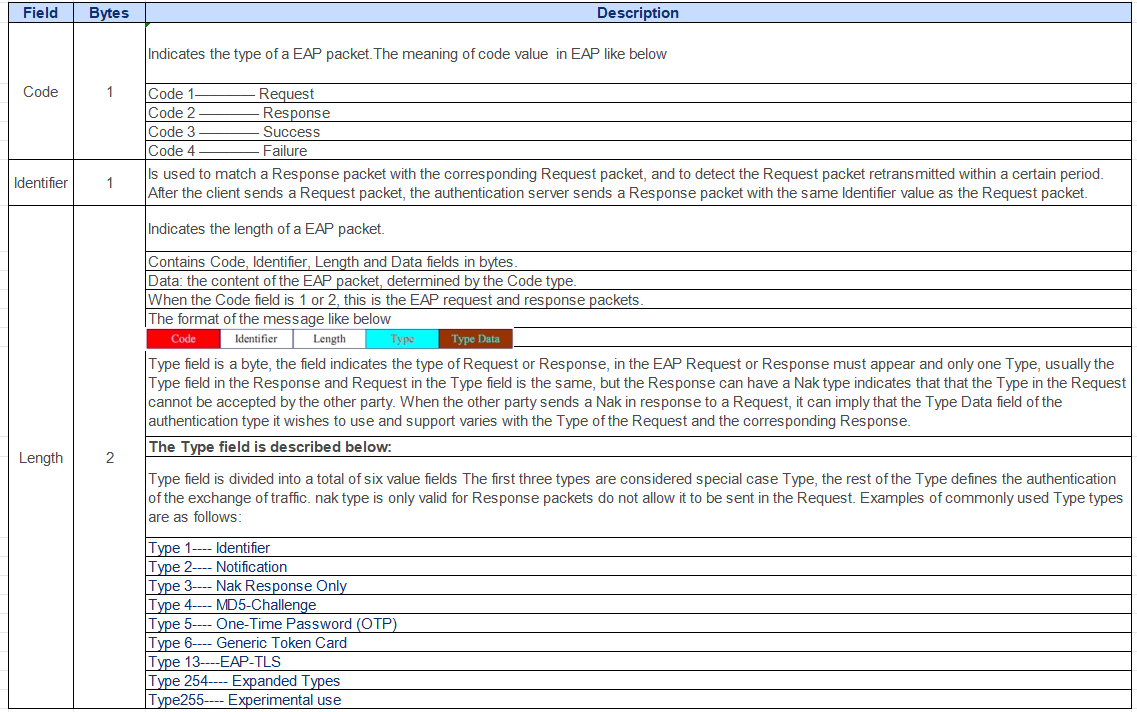
Format of the EAPOL packet
EAPOL is a message encapsulation format defined by the 802.1X protocol and is mainly used to transmit EAP protocol messages between the client side and the device side to allow EAP protocol messages to be transmitted over the LAN.
The format of an EAPOL packet is shown in Figure .
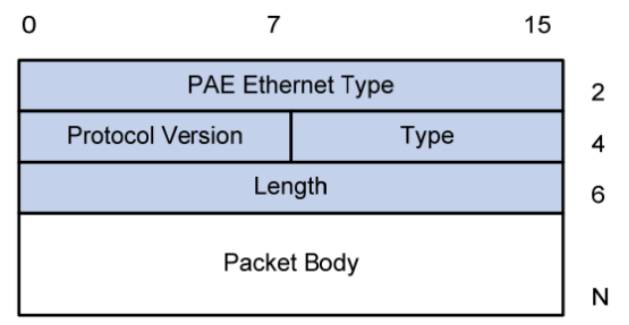
Table 1-1 Fields in an EAP packet Fields in an EAPoL packet
About Radius message encapsulation of EAP attributes
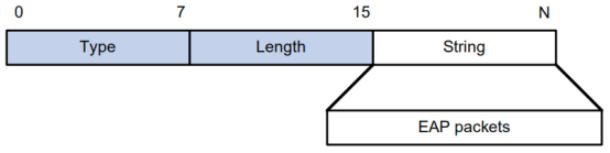
RADIUS adds two attributes to support EAP authentication: EAP-Message and Message-Authenticator. The other related descriptions for the RADIUS protocol's message format.
EAP-Message
This attribute is used to encapsulate the EAP packet, the type code is 79, the maximum length of the String field is 253 bytes.If the length of the EAP packet is longer than 253 bytes, it can be fragmented and sequentially encapsulated in multiple EAP-Message attributes.
Message-Authenticator
This attribute is used to avoid eavesdropping on access request packets during the use of EAP authentication methods. In a packet containing the EAP-Message attribute, it MUST also contain the Message-Authenticator attribute, the value of which is used to verify the integrity of the packet, if the integrity check value calculated by the receiver for this message does not match the value of the Message-Authenticator attribute carried in the message, the packet will be considered invalid and discarded.

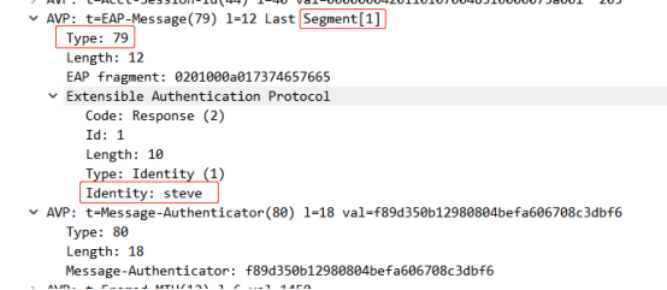
Radius Message Encapsulation Example
About 802.1x authentication trigger method
The 802.1X authentication process can be initiated either by the client on its own initiative or by the device side. The authentication triggering methods supported by the device include the following
1. Client-initiated triggering method
The client actively sends an EAPOL-Start message to the device to trigger the authentication, and the destination address of the message is a multicast MAC address assigned by the IEEE 802.1X protocol : 01-80-C2-00-00-03.
2. Device-side Active Trigger Method
The device-side triggering method is used to support clients that cannot actively send EAPOL-Start messages, such as the 802.1X client that comes with Windows XP. Depending on the way of sending EAPOL-Start message, there are the following two triggering methods,
Multicast trigger: The device actively sends multicast EAP-Request/Identity messages to the client every N seconds (default is 30 seconds) to trigger authentication.
Unicast trigger: When the device receives a message with an unknown source MAC address, it actively sends a unicast message to the MAC address to trigger authentication. If the device side does not receive a response from the client within the set time limit, the message is retransmitted.
About 802.1X Authentication Process
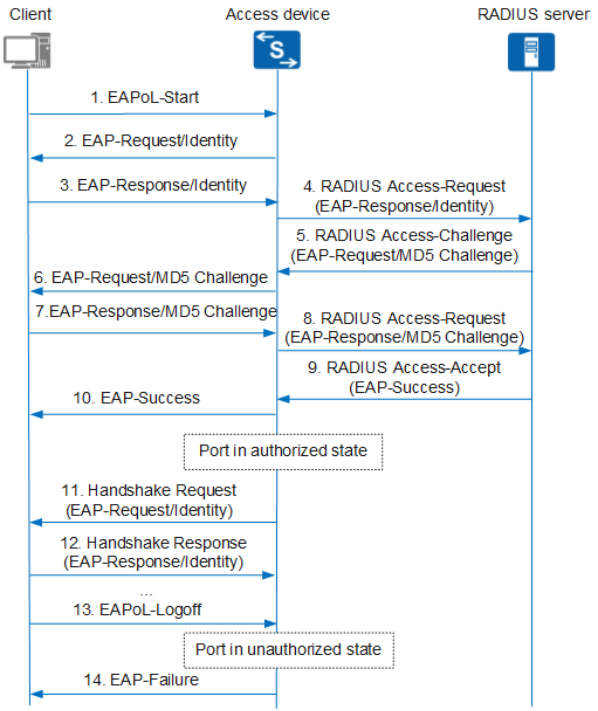
1.Authentication Processes in EAP Relay
2. EAP Termination Modes
About EAP Extended Authentication Protocol (EAP)
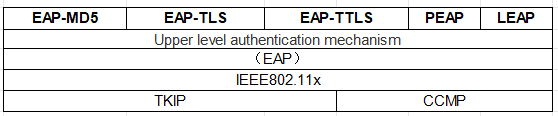
The Extensible Authentication Protocol (EAP: Extensible Authentication Protocol) is a comprehensive Layer 2 authentication protocol, an authentication framework that supports a variety of authentication methods, not a specific authentication mechanism.EAP provides some public functionality and allows negotiation of the desired authentication mechanisms. These mechanisms are called EAP methods, and there are now about 40 different methods. The following is a brief description of some of the major authentication methods on the EAP protocol.
EAP-MD5
EAP-MD5 is an IETF open standard but provides minimal security. the MD5Hash function is vulnerable to dictionary attacks.
The above EAP relay authentication is the process of EAP-MD5 authentication. (omitted)
EAP-TLS (Transport Layer Security)
EAP-TLS is an open standard of the IETF and is well supported among vendors. It provides good security guarantees. It uses Public Key Infrastructure (PKI), which requires that both the client and the server must have a legitimate identity and a valid certificate, i.e., EAP-TLS authentication requires that the site and the authentication server (RADIUS) prove each other's identities by means of a public key and exchanging each other's digital certificates, and it is a two-way authentication authentication method. Although EAP-TLS has good security, the load on the user side during authentication becomes its Achilles' heel. Moreover, EAP-TLS does not encrypt the username when transmitting it, i.e., the username in the EAP-Identity packet is displayed in plaintext when the packet is captured.
EAP-TLS authentication process
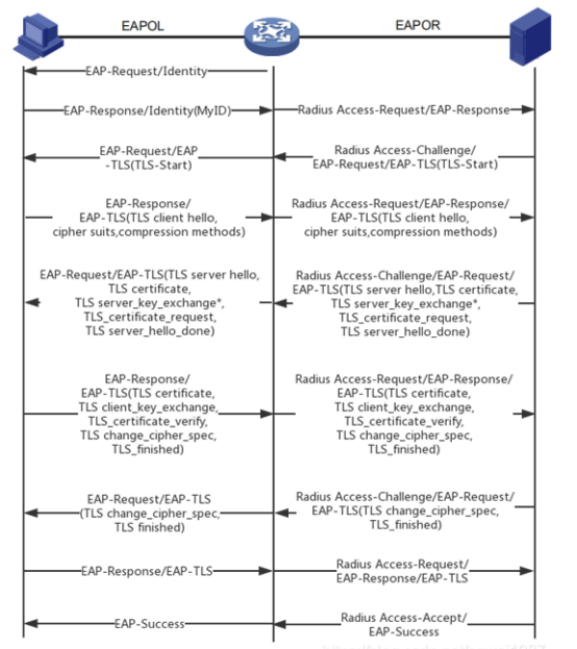
1. first of all, the client sends an Identity message to the access user, requesting the client to provide identity;
2. the access user to the client to respond to the Identity message, the content of the user's identity, the client will be encapsulated into a Radius access request message to the server;
3. the server will send a Radius access challenge message to the client after obtaining the access user's access identity, and the client will decapsulate the message and pass the TLS-Start message to the access user after receiving this message;
4. the access user sends a TLS Client Hello message to the client, the Client Hello message includes the supported TLS protocol version, supported encryption algorithms, supported compression methods, and client random numbers, etc. After the client receives it, it encapsulates the message into an Access-Request and passes it to the server;
5. After receiving the Radius Access-Request message from the server, the client passes the TLS Server Hello message to the access user, which includes server_hello, certificate, certificate_request, server_hello_done, of which server The server_hello message includes confirmation of the version of the TLS protocol used, the server random number generated by the server, the session ID, and confirmation of the encryption algorithm used, etc. The certificate represents the server's certificate, and the certificate_request represents the request for the client to provide the certificate. server_hello_done represents the end of the server hello process.
6. The access user sends a TLS change cipher spec message to the client, which will be encapsulated by the client into an Access-Request message and passed to the server. The change cipher spec message includes the following contents, where certificate refers to the client certificate, client_key_exchange contains the pre-master certificate, and client_key_exchange contains the pre-master certificate. exchange contains the pre-master secret, the third random number generated by the client, the pre-master secret first adopts the RSA algorithm to generate a 48-byte random number, and then encrypted with the public key of the server and then put into the message, the content of certificate_verify is up to this step The content of certificate_verify is the signature result of all the handshake messages received and sent, the function of change_cipher_spec is that the client notifies the server to start using encryption to send messages, and the client uses the above three random numbers client random, server random, pre-master secret, and calculates the 48-byte master secret, this is symmetric encryption. The client uses the above 3 random numbers client random, server random, pre-master secret to calculate the 48-byte master secret, which is the key of the symmetric encryption algorithm, finished for the first encrypted message sent, which uses the HMAC algorithm to calculate the summaries of all the handshake messages received and sent, and then a pseudo-function defined by RFC5269 in the PRF calculates the results, encrypted and sent;
7. the server sends the Access-Challenge message to the client, the access user will receive the TLS change cipher spec message, here the handshake ends;
8. the client receives the EAP-TLS message sent by the access user, and then encapsulates this message into an Access-Request message and passes it to the server;
9. the server sends the Access-Accept message to the client, the access user will receive EAP-Success.
PEAP(Protected Extensible Authentication Protocol)
Protected Extensible Authentication Protocol (PEAP) is a new member of the Extensible Authentication Protocol (EAP) family. It is a joint proposal for an open standard by CISCO, Microsoft and RSA Security. It is similar in design to EAP-TTLS in that the client station confirms the identity of the authentication server by verifying the PKI (Public Key Infrastructure) digital certificate used, and then establishes a unidirectional TLS pipeline that allows the client's authentication data (passwords, personal identification numbers PINs, etc.) to be compressed into TLS messages and transmitted securely to the authentication server. transmitted securely to the authentication server. There are two PEAP subtypes: PEAPv0/EAP-MSCHAPv2 and PEAPv1/EAP-GTC.
The process of EAP-PEAP authentication. (omitted)
EAP-TTLS(Tunnelled Transport Layer Security)
Extended Authentication Protocol - Tunnel Transport Layer Security EAP-TTLS was developed by Funk Software in collaboration with Certicom. It is currently an IETF Open Draft Standard. It is an extension of EAP-TLS. The difference with EAP-TLS is that the requirements for certificates are not as strict, only server certificates need to be provided, while client certificates are not required. It can be supported across platforms, provides very good security, and uses PKI certificates on the authentication server.
EAP_TTLS is a composite authentication method that consists of two main phases:
The first stage is to establish a TLS tunnel between the user and the authentication server.
The second phase is to authenticate within the established tunnel using other authentication methods. This authentication is also highly secure by nesting other authentication methods within the TLS tunnel to complete the authentication of the client.TTLS is very scalable and supports almost all authentication methods, including MSCHAPv2.
Flow of EAP-TTLS authentication. (omitted)
Operation
Switch or router configuration example ,Here we take H3C router configuration asa an example.
Router configuration
1. Configure the router interface address
Configure on the port or on the vlan .As it shows in the example,
interface Vlan-interface2
ip address 192.168.22.1 255.255.255.0
dhcp server apply ip-pool lan2
ipv6 dhcp select server
ipv6 dhcp server apply pool ipv6
ipv6 address 2019::1/64
undo ipv6 nd ra halt
2. Configure the local user (optional)
The local user's username and secret key need to be the same as the server-side username and password. The password can be in plaintext when configured, but not when displayed.
As it shows in the example.
local-user 8021 class network
password cipher $c$3$qRUZx61+vDZ3IoAQTuJ8pecYd/ZkuIzXeA==
service-type lan-access ////Configure the service type for local users as network access
3. Configure the RADIUS scheme
RADIUS scheme, in fact, is the H3C router needs to send authentication and billing messages to where, that is, the IP address of the authentication server and billing server, usually authentication and billing is the same radius server. In addition, it should be noted here that this key is the pre-shared secret key of the account on radius, the default is testing123, which must be consistent with the radius server settings. At the same time, it should be noted that because we support the use of authentication, do not need to billing, so the billing server configuration is not needed.As it shows in the example.
radius scheme radius
primary authentication 172.28.26.110
key authentication cipher $c$3$RzwHmJs8YypKMkN5WfSKTAcLgsCnP4nkg1PUO9o=
4. Configure ISP domian
Configure the ISP domain, that is, the configuration specifies whether the domain user authentication is radius authentication or local authentication (related to the authentication mode selection) or first radius authentication, radius authentication no response and then local authentication. The same billing-related configuration is not required.As it shows in the example.
domain dot1x ////Configure the dot1x domain, which requires a radius scheme for network authentication, then local.
authentication lan-access radius-scheme radius local
authorization lan-access radius-scheme radius local
accounting lan-access none
5. Enable 802.1X on port
Enable 8021.x authentication on the port, and when it is enabled, only authenticated ones can access the network through the port.As it shows in the example.
interface GigabitEthernet0/3 ////Enable 802.1x authentication on port 0/3
port link-mode bridge
port access vlan 2 ////Vlan configuration can be ignored, not related to authentication, but related to address acquisition after authentication
dot1x ////Enable 802.1x authentication on the port
dot1x mandatory-domain dot1x ///Specifies the mandatory authentication domain to be used for port 802.1x users.
6. Enable 802.1x authentication and authentication mode globally
If you specify authentication-method as eap, it means that the H3C router device adopts the EAP relay authentication method. In this method, the device side relays the EAP messages sent by the client and can support all types of EAP authentication methods between the client and the RADIUS server. We configure the example for this authentication method.
If you specify authentication-method as CHAP or PAP, it means that the device adopts the EAP termination authentication method, in which the device end performs local termination of EAP messages sent by the client and can support the authentication method of CHAP or PAP type between the client and the RADIUS server. This method is also applicable to local authentication.As it shows in the example.
dot1x
dot1x authentication-method eap ////Configured here as EAP relay authentication method.
7. Verify Configuration
Use display dot1x interface to view all 802.1x configurations on port GigabitEthernet0/3 and to see the online user information on the port after successful authentication.
Radius Server Installation and Configuration
1. Install Radius server
The installation of Radius can be viewed at the following webpage, which provides step-by-step instructions to complete the entire installation process on Centos.
Here is the link https://blog.csdn.net/zy517863543/article/details/78914150
2. Introduce to the main RADIUS profiles
The RADIUS server configuration files are all contained under the /etc/raddb/ directory or related subdirectories.
Radiusd.conf: the main radius server configuration file, as long as it contains applications to other configuration files.
Client.conf: defines the NAS side, contains the IP address or IP address segment and the shared secret key.
Sites-enabled/default: this is the default virtual server (up to 2.0.0, radius supports virtual hosting), this file controls authentication and billing request processing and contains the configuration for each authentication protocol.
Sites-enabled/inner-tunnel: This is the virtual server that handles authentication methods hosted on a TLS tunnel, such as EAP-TTLS or some PEAP authentication.
Users: the traditional radius user configuration file. You can leave this file unedited. In the new version, the user information is written directly into the data via the front-end web.
Client.conf: configuration file for adding nas.
Certs: This directory holds EAP certificates.
3. Initial test after installation
After the Radius server is installed, you can use systemctl start radiusd.service and systemctl stop radiusd.service to start or stop the radius service.
However, it is recommended that the first step is to start it in debug mode using the root user. This step is important.
#radius -X
If you see "Ready to process requests" in the printout, it means that the radius server is up and running, otherwise you need to look at the startup printout carefully to find out the error messages and troubleshoot any possible installation or operational problems.
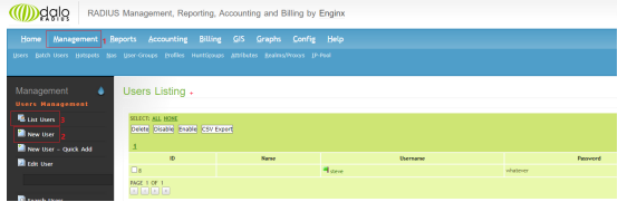
After it is up and running, you need to do some initial testing. Our installation mode is to store user information in the data, so we can configure a user through the front web interface, and use the user to actually verify the test. Open a browser and enter the following URL: http://localhost/daloradius/index.php, enter your username and password to log in and then select New User under the Management menu to add a new user, and you can view the list of added users through List Users.
Then open another terminal serial port and run the radtest command
[root@localhost raddb]# radtest steve whatever 172.28.26.110 0 testing123
Sent Access-Request Id 102 from 0.0.0.0:47611 to 172.28.26.110:1812 length 75
User-Name = "steve"
User-Password = "whatever"
NAS-IP-Address = 127.0.0.1
NAS-Port = 0
Message-Authenticator = 0x00
Cleartext-Password = "whatever"
Received Access-Accept Id 102 from 172.28.26.110:1812 to 0.0.0.0:0 length 20
[root@localhost raddb]#
If you see "Access-Accept" in the last response from the server, then the initial test is complete. Completion of the initial test means that the following authentication methods have been enabled for the user:
PAP, CHAP, MS-CHAPv1, MS-CHAPv2, PEAP, EAP-TLS, EAP-TTLS, EAP-GTC, EAP-MD5.
If you don't see an accept message in the response, then go to the radius debug window and watch for red or yellow printouts, which generally describe what the error is and how to locate the problem.
4. Add clients
The client mentioned here is relative to the radius server, not the authenticated client. This client is what we usually call the NAS side. Edit clients.conf and add the following.
client south {
ipaddr = 172.28.0.0/16
secret = testing123
require_message_authenticator = no
}
This way all clients from the 172.28.0.0 network segment can access the RADIUS server.
5. Configure Authentication on IP Phone
Configure EAP-MD5 Authentication on IP Phone
After completing the user addition and NAS side addition, we can use the actual phone device to configure to complete the corresponding authentication.
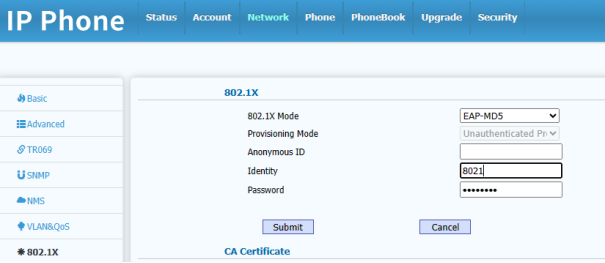
Then connect the phone's network cable to port 0/3 on the router configured with 802.1x authentication application. After the phone reboot is completed, the phone will initiate 802.1x authentication, and the port data access can only be opened after the port authentication is passed. Therefore, if the phone interface correctly obtains the IP address, it means that the EAP-MD5 authentication passes. Otherwise, check the printout of the radius server in debug mode to see the reason for failure and troubleshoot the problem.
Configure EAP-TLS Authentication on IP Phone
EAP-TLS authentication is relatively more complex than EAP-MD5 authentication method, because as introduced above EAP-TLS authentication requires the client and server to mutually authenticate each other's certificates. So first we need to do the relevant certificate configuration on the radius server.
Into the raddb/certs directory, the directory stores radius server-related certificates, the default path already contains a number of certificate configuration files and ca.pem, server.pem, client.pem certificates, if there is no certificate file, you can use the following commands to generate the corresponding certificate file.
#cd /etc/raddb/certs
# make
Additional Certificate Files for the manufactured certificate files. Export the certificates in the certs directory and import the ca.pem into the phone CA certificate and the client.pem certificate into the device certificate of the phone.
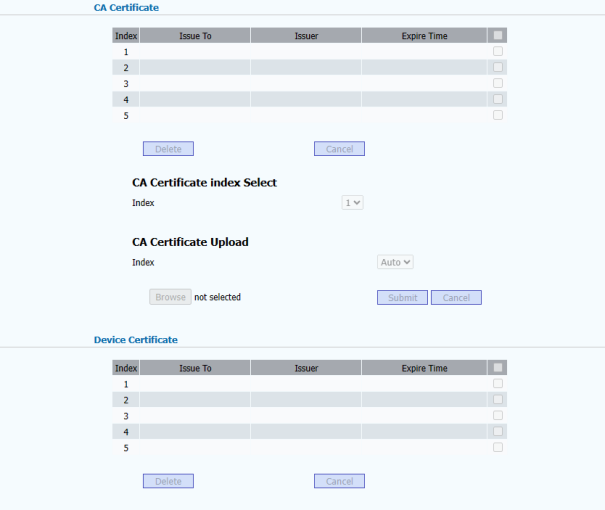
After importing the certificate, modify the authentication method to EAP-TLS and enter the user name and password, here we should pay special attention to the password is the password in the certificate, if the certificate configuration file has not been modified, the default password is: whatever, if the password is not correct, the authentication is likely to be rejected.
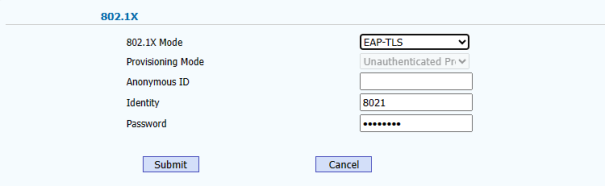
As in the case of EAP-MD5, after the authentication passes, the data port opens and the device will get the IP address correctly. Otherwise check the radius server print in debug mode to see the reason for failure and troubleshoot the problem.
6. Production of industrial environmental certificates
Certs directory certificates can be used for testing, and can not be used directly for industrial environments, if you need to produce certificates that can be used in industrial environments, you need to modify the certificate configuration file based on the actual situation of the organisation, generally the following certificate configuration of the blacked out part of the basic need to be modified according to the actual situation to the certificate of the ca certificate to give an example.
...
[ req ]
prompt = no
distinguished_name = certificate_authority
default_bits = 2048
input_password = whatever
output_password = whatever
x509_extensions = v3_ca
[certificate_authority]
countryName = FR
stateOrProvinceName = Radius
localityName = Somewhere
organizationName = Example Inc.
emailAddress = admin@example.com
commonName = "Example Certificate Authority"
...
Alternatively: we can also use the SSL service to manually generate a certificate. Commonly used certificate generation commands are as follows
A. Make root certificate
cd etc/ssl
openssl req -newkey rsa:1024 -md5 -config ./openssl.cnf -keyout rootkey.pem -out rootreq.pem -days 3650
openssl x509 -req -in rootreq.pem -md5 -extfile./openssl.cnf -extensions v3_ca –signkey rootkey.pem -out rootcert.pem –days 3650
cat rootcert.pem rootkey.pem > root.pem
Once it's done, the rootcert.pem and root.pem inside are the ones we'll need.
B. Making a radius server certificate
Under the etc/ssl directory, create a file with the filename xpextensions and write the following in the file and save it.
[xpclient_ext]
extendedKeyUsage= 1.3.6.1.5.5.7.3.2
[xpserver_ext]
extendedKeyUsage= 1.3.6.1.5.5.7.3.1
cd etc/ssl
openssl req -newkey rsa:1024 -md5 -config ./openssl.cnf -keyout serverkey.pem –out serverreq.pem -days 365
openssl x509 -req -in serverreq.pem -md5 -extfile xpextensions-extensions xpserver_ext –CA root.pem -CAkey root.pem -CAcreateserial –out servercert.pem -days 365
cat servercert.pem serverkey.pem rootcert.pem >server.pem
After making it, the server.pem inside is what we need.
C. Create client certificates
cd etc/ssl
openssl req -newkey rsa:1024 -md5 -config ./openssl.cnf -keyout clientkey.pem –out clientreq.pem -days 365
openssl x509 -req -in clientreq.pem -md5 –extfile xpextensions -extensions xpclient_ext –CA root.pem -CAkey root.pem -CAcreateserial -out clientcert.pem -days 365
cat clientcert.pem clientkey.pem rootcert.pem >client.pem
Once it's made, the client.pem inside is what we need.
Conclusion
Through the installation and configuration of authentication protocols and authentication frameworks as well as routers and radius servers, we have completed EAP-MD5 authentication and EAP-TLS authentication. However, the EAP authentication framework also supports many other authentication methods, such as: PEAP/EAP-GTC, etc., we can understand and familiar with the corresponding authentication process, and in the current environment on the basis of the continuous improvement of the authentication configuration of each module to gradually support a variety of authentication applications.