UC

Customer Pain Points Emerging Customer Requirements Solution Overview Solution Highlights Solution Value Success cases
65420931

UC

Enterprise Mobile Office
Unified Communications Solution

Customer Pain Points

  • Limited Workplace
    Flexibility
    82576403
    Traditional desk phones are tied to fixed workstations, making it difficult for employees to answer calls when away from their desks.
  • Inefficient Communication for Remote Staff
    08257391
    Field engineers, sales teams, project staff, and remote employees often rely on personal mobile phones for busi­ness communications, resulting in inconsistent caller identities and unstandardized communication management.
  • Low Collaboration Efficiency
    37614590
    Mobile employees lack access to unified enterprise directories, extension-to-extension calling, and conferencing capabilities on mobile devices, reducing communication and collaboration efficiency.
  • High Communication
    Costs
    93675281
    Employees using personal mobile phones for business calls generate additional communication expenses. The mixing of personal and business numbers also creates management challenges and negatively impacts corporate image.

Emerging Customer
Requirements

4
Upgrade to new
requirements
  • 8149530701
    Extension Mobility and Mobile Office
    Employees should be able to access their office extensions anytime and anywhere using mobile devices, wheth­er working in the office, remotely, traveling, or operating in the field.
  • 5806314702
    Unified Corporate Caller ID
    Whether employees are working from the office or remotely, outbound business calls should consistently display the company hotline number, enhancing brand consistency and communication management.
  • 8753496103
    Single Number Reach
    A single extension number can simultaneously register across desk phones, mobile apps, and PC softphones, en­abling simultaneous ringing and allowing users to answer calls from any device.
  • 1790425604
    Unified Collaboration
    Employees should be able to synchronize enterprise and personal contacts on mobile devices while supporting internal extension dialing, conferencing, and centralized inbound call management, reducing communication costs and improving collaboration efficiency.

Solution Overview

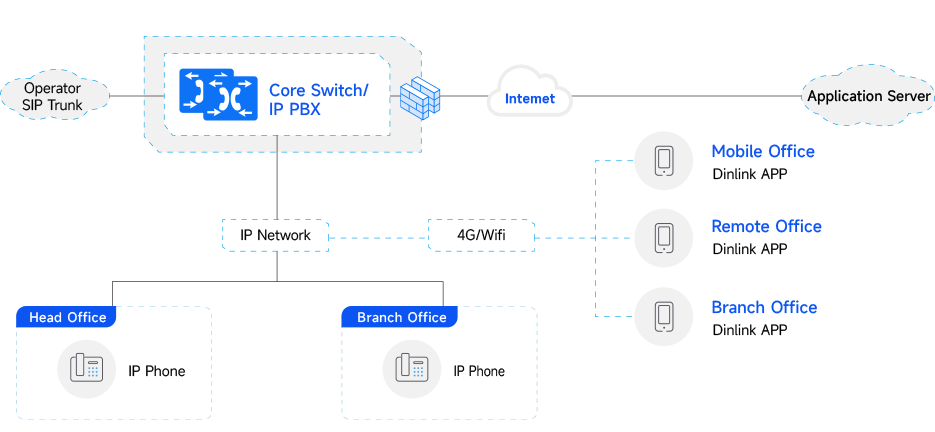
As a leading provider of IP communications solutions, DINSTAR delivers a one-stop Enterprise Mobile Unified Communications Solution built on the UC Series IPPBX platform together with the Dinlink mobile application. The solution removes traditional workspace limitations by transforming smartphones into enterprise mobile ex­tensions, enabling extension mobility, one number multi-device access, and seamless internal and external col一 laboration.

By building a highly efficient, agile, reliable, and cost-efficient enterprise communications platform, DINSTAR helps organizations accelerate digital transformation and create a modern communications experience centered around "Extension Mobility and Seamless Connectivity."
  • Telephony System Deployment
  • Endpoint Layer
75824301

Telephony System Deployment

Deploy the DINSTAR UC8000 Softswitch or UC Series Hardware IPPBX platforms (such as UC200 Pro and UC350 Pro) within the enterprise network as the core voice communications platform.
The system provides comprehensive enterprise communication capabilities, including.
  • 01

    Core Layer

    74869025

    Core Layer

    Extension management

    SIP trunk connectivity

    Call control

    Voicemail

    Call recording

    IVR

    Call queues

    Audio conferencing

  • 02

    Access Network

    07248935

    Access Network

    The UC Series offers excellent SIP/IMS interoperability and supports direct integration with carrier SIP trunks. PSTN connectivity can also be achieved through trunk gateways, enabling flexible expansion of external line resources.

64582031

Endpoint Layer

Office Desk Phones
• Deploy IP phones registered to the IPPBX to support fixed-office communication requirements.

Mobile Endpoints
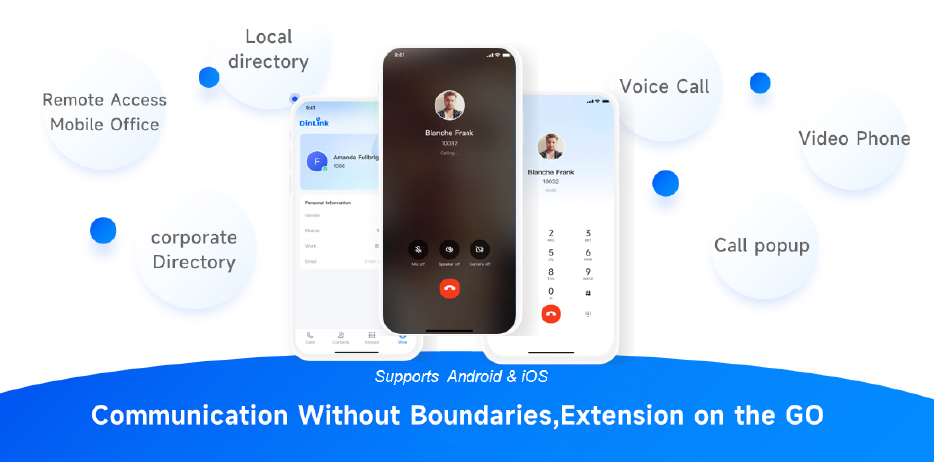
• Employees install the DinLink App on smartphones and register extensions through Wi-Fi or 4G/5G networks, enabling mobile office, remote work, and hybrid work scenarios.

DinLink App Features
• One-number synchronization • Call transfer / hold / conferencing
• HD voice calling • Background wake-up incoming call support
• Enterprise directory • Call recording
• Local contact synchronization

Solution Highlights

  • 35970624
    HIGHLIGHT 01
    Extension Mobility with Seamless Connectivity
    The mobile app and office desk phone share the same extension number and corporate caller ID, enabling em­ployees to stay connected with colleagues and customers anytime and anywhere.
  • 32716058
    HIGHLIGHT 02
    Mobile Work Support

    Supports secure access across office networks, remote work environments, business travel, field operations, cross-region, and multinational collaboration scenarios.

  • 82713649
    HIGHLIGHT 03
    Single Number Reach with Simultaneous Ringing
    Desk phones, PC softphones, and mobile apps can ring simultaneously, ensuring important calls are never missed.

  • 89641053
    HIGHLIGHT 04
    Reliable Background Connectivity
    The Dinlink App is compatible with major smartphone brands worldwide and supports persistent background operation, allowing incoming calls to ring normally even when the device screen is locked or inactive.
  • 08762934
    HIGHLIGHT 05
    Efficient Unified Collaboration
    The mobile app automatically synchronizes enterprise and local contacts while supporting one-click dialing, con­ferencing, call transfer, voicemail, and call recording.
  • 46379815
    HIGHLIGHT 06
    Separation of Business and Personal Numbers
    When employees place business calls through the Dinlink App, outbound calls display the company's unified caller ID, protecting personal privacy while strengthening corporate branding.

Solution Value

  • 98460523
    Improved Workforce Productivity
    Employees remain connected anytime and anywhere, enabling faster business response times, smoother collab­oration, and significantly improved operational efficiency.
    Show More Put Away
  • 76493085
    Enhanced Customer Satisfaction
    Mobile extensions remain continuously online, reducing missed calls and improving service responsiveness and customer satisfaction.
    Show More Put Away
  • 97618204
    Reduced Enterprise Communication Costs
    Internal extension dialing remains available outside the office, while cross-region branch communications can be achieved with minimal communication costs, reducing long-distance and roaming expenses.
    Show More Put Away
  • 06439571
    Stronger Corporate Branding
    Unified outbound caller ID improves corporate image, strengthens customer trust, and enhances business pro­fessionalism.
    Show More Put Away
  • 16059437
    Simplified O&M and Reduced IT Investment
    Centralized management, remote maintenance, and batch provisioning significantly simplify device administra颅tion and maintenance costs.
    Show More Put Away
  • 42186059
    Scalable Communications for Business Growth
    The solution flexibly supports remote work, multi-branch deployment, and multinational collaboration, helping enterprises accelerate digital transformation and improve business agility and competitiveness.
    Show More Put Away
Service Feedback
Service Feedback
Please fill in the information and submit the service
evaluation and suggestions online
  • *Name

  • *Country

  • *Company Name

  • *Email

  • *DeviceType

  • *DeviceSN

  • *Snapshot of Device SystemInformation Page